
Two online stores sell the same product for $49. One explains delivery times before checkout, includes detailed customer reviews and makes returns easy to understand. The other has better product photography but reveals a $9 shipping fee only after the customer enters their address.
Even if both stores attract the same number of visitors, their sales results could be very different. The second store may spend more on advertising simply to replace customers who leave before paying.
Comparing your online store with competitors helps identify problems that ordinary traffic reports cannot explain. You can see how other retailers present their products, handle delivery questions, structure their checkout and convince visitors to buy.
The most useful comparisons focus on specific purchasing decisions. A store receiving fewer orders does not automatically need more advertising. It may need clearer product information, better delivery terms or a simpler way to complete purchases.
Start by Comparing Stores That Sell to the Same Customers
A small online clothing store should not judge every part of its business against Amazon. A major marketplace has a different product range, logistics network and customer base. A comparison with smaller retailers selling similar clothing at similar prices will reveal more realistic opportunities.
Choose three to five competitors that customers might consider when buying from your store. Include direct competitors selling similar products and one established retailer whose shopping experience you want to study.
- Products and categories that overlap with your store
- Typical prices for comparable items
- Shipping charges and estimated delivery times
- Return policies and refund conditions
- Available payment methods
- Customer review availability and presentation
- Promotions, bundles and loyalty offers
Keep the comparison focused on products a customer could reasonably purchase from either business. A premium leather handbag and a low-cost synthetic alternative may attract some of the same shoppers, but their prices serve different expectations.
Our earlier article on competitive intelligence software for businesses covers tools that can help collect and organize competitor information.
Find Out Which Products Customers Prefer Elsewhere
Start with products that attract visitors but generate few orders. A product page receiving 2,000 visits and 12 purchases deserves closer attention than a page receiving 40 visits and no sales.
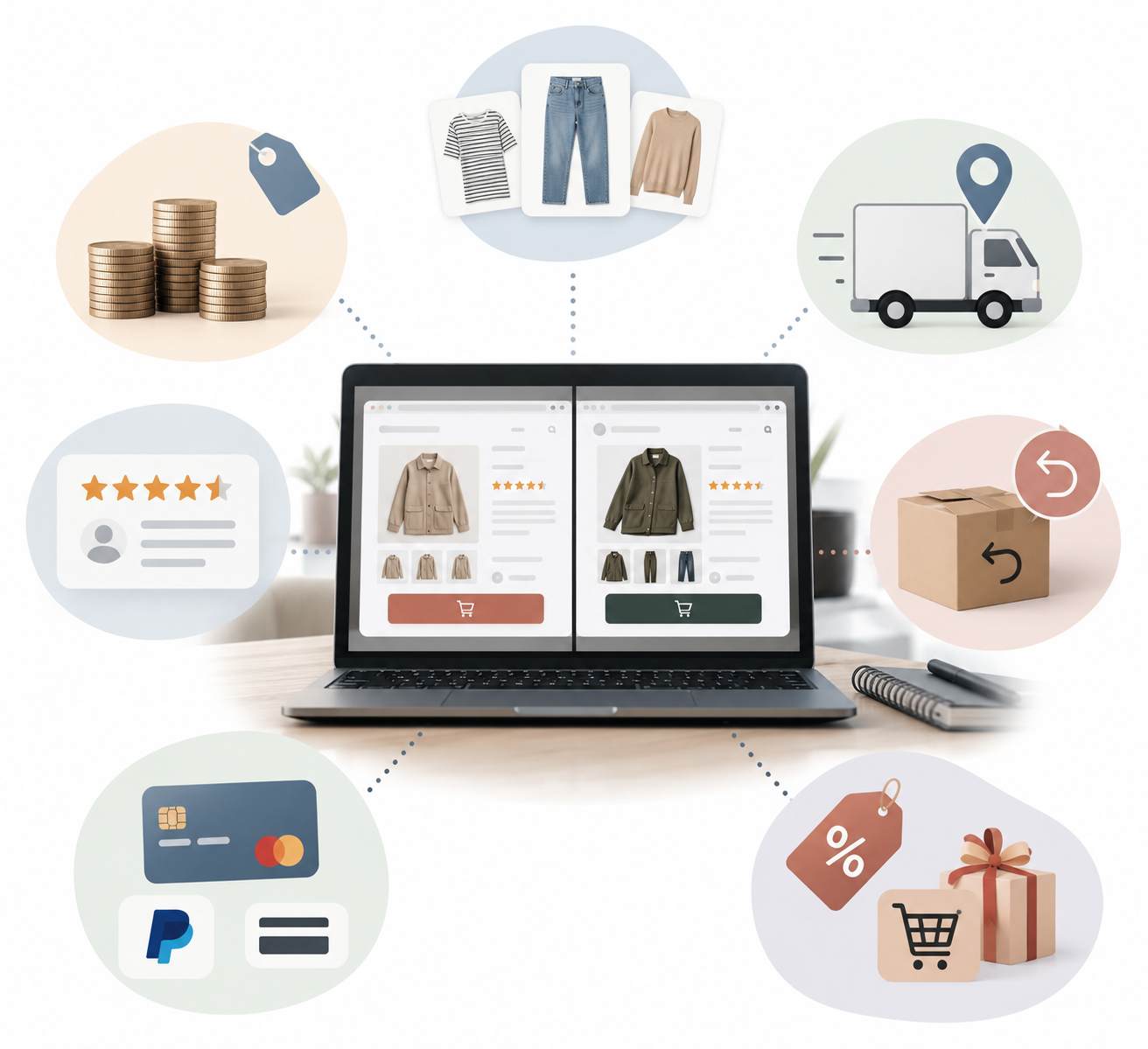
Open your product page and the closest competing product page side by side. Compare what a customer can learn without contacting support.
| Feature | Your Store | Competitor | Possible Customer Concern |
| Product photos | Three studio images | Eight images, including real use | Uncertainty about appearance and size |
| Product description | Short feature list | Measurements, materials and use instructions | Missing purchase information |
| Customer reviews | No visible reviews | Verified reviews with photos | Limited independent feedback |
| Delivery information | Available at checkout | Displayed near the purchase button | Uncertainty about delivery cost |
| Returns | Policy linked in footer | Return window explained on product page | Extra effort to assess purchase risk |
The entries above are an illustrative comparison, not results from an actual retailer. Their purpose is to identify specific gaps that you can investigate using your own store data.
Suppose your product description says only that a jacket is waterproof. A competitor explains the fabric, sizing, washing instructions and intended weather conditions. A shopper deciding between the two may have enough information to purchase the competing jacket without asking another question.
Review your product pages for unanswered customer questions. Support emails and product return reasons can reveal missing details that a visual competitor comparison might overlook.
Compare the Final Price, Not Just the Product Price
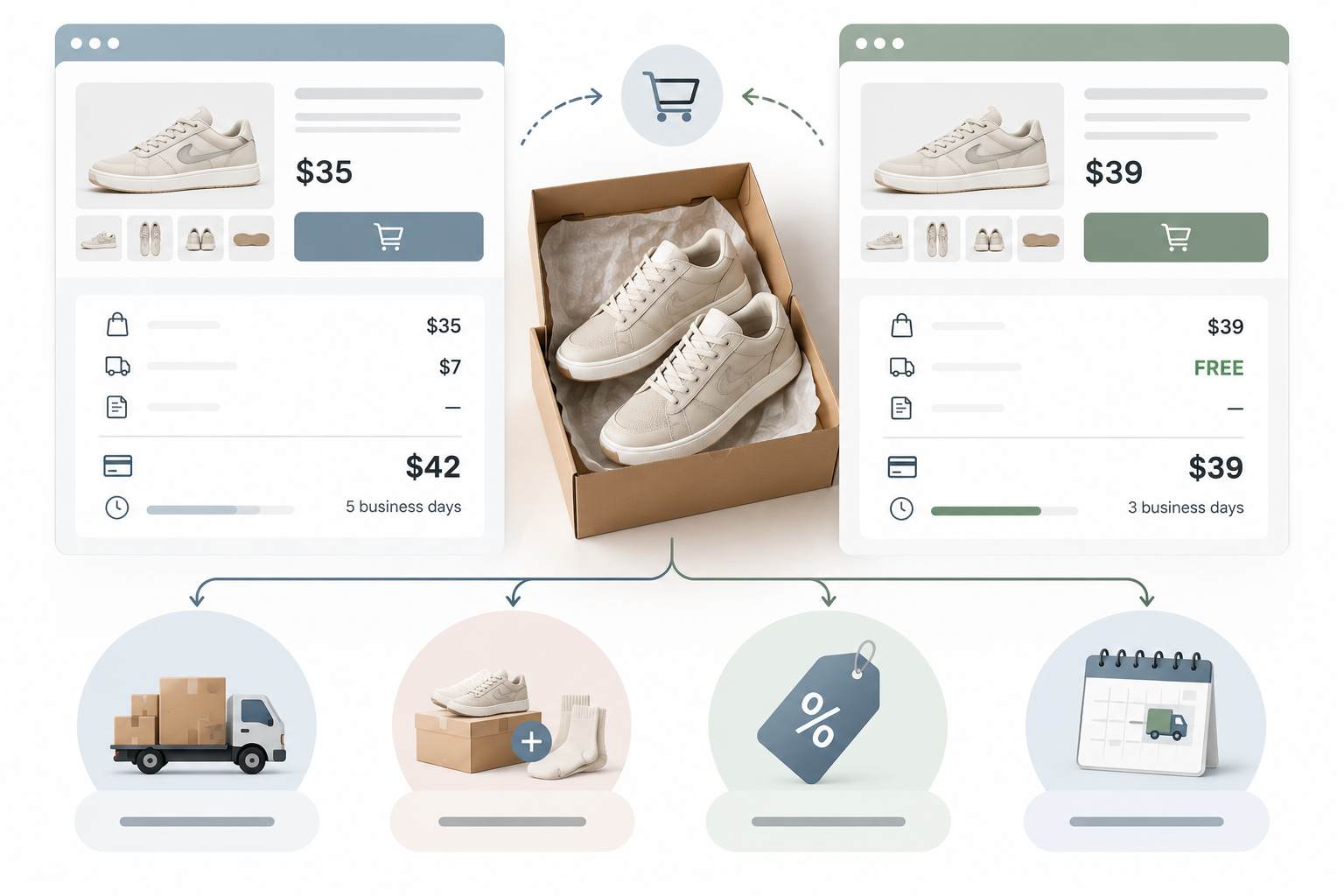
Displaying the lowest price does not guarantee that your store offers the lowest total cost.
A customer buying a $35 product might pay $42 after shipping at one store and $39 at another. A retailer advertising the lower product price could lose the order when the total becomes visible.
Choose three to five comparable products and calculate the actual checkout total for the same delivery destination. Include shipping, mandatory fees and applicable taxes. Consider discounts only when the customer meets the published conditions.
Use a comparison table like the following.
| Cost | Store A | Store B |
| Product price | $35 | $39 |
| Shipping | $7 | Free |
| Total before tax | $42 | $39 |
| Estimated delivery | 5 business days | 3 business days |
In the hypothetical example, Store B is $3 cheaper overall and offers a shorter delivery estimate. Matching its advertised product price would not address the actual purchasing disadvantage.
Avoid automatically lowering prices after finding a cheaper competitor. Calculate your product margin, fulfillment costs and available room for promotions first. A lower price that produces unprofitable orders creates another business problem.
Sometimes displaying shipping charges earlier, offering a bundle or introducing a reasonable free-shipping threshold will address customer concerns without reducing every product price.
Complete the Checkout Process on Every Competitor Website
Store owners spend a great deal of time improving their homepage and product catalog, yet checkout problems can go unnoticed for months.
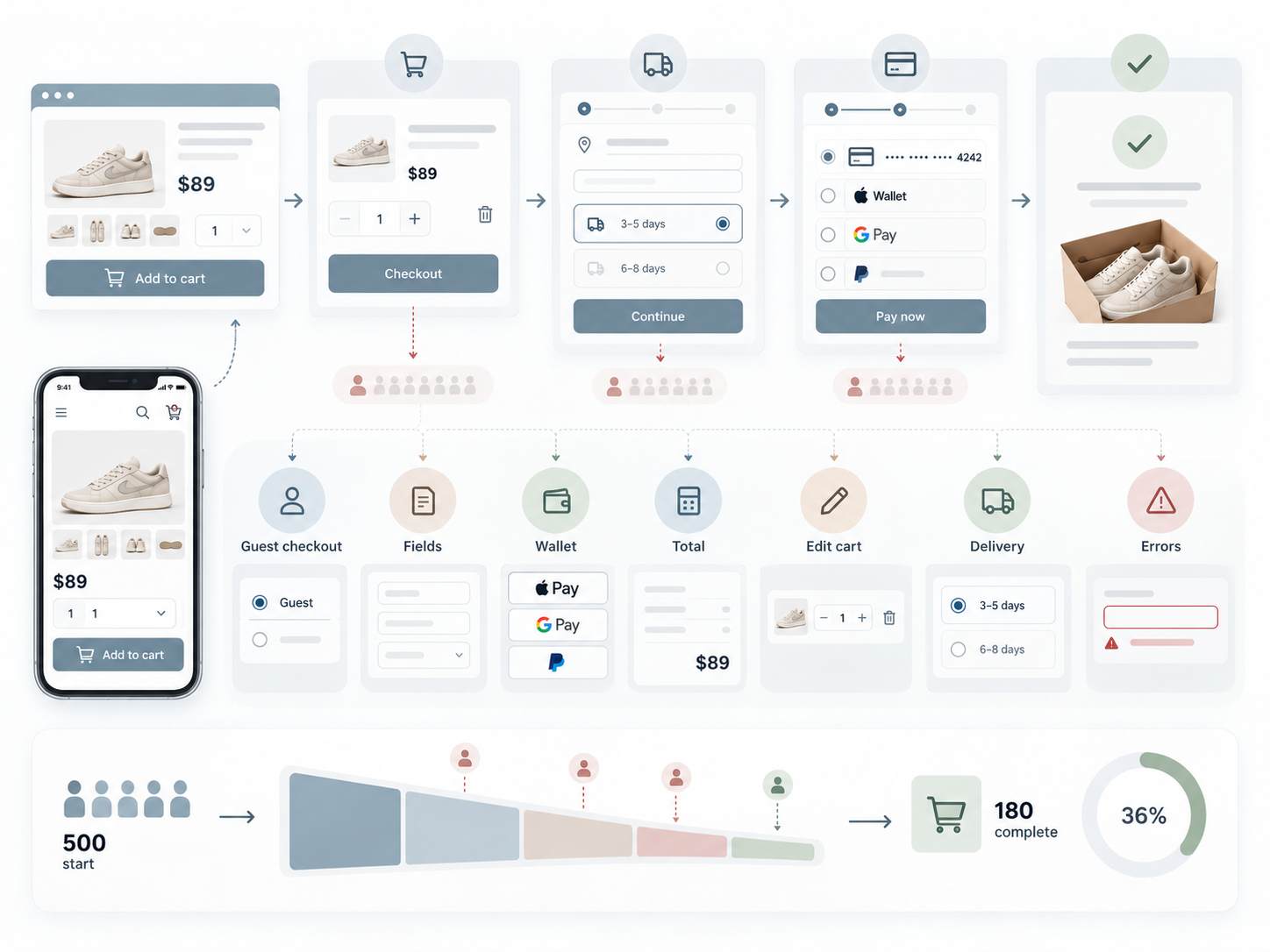
Visit your competitors as an ordinary customer. Add a product to the cart, proceed through checkout and record each step before payment. Stop before placing an order unless you genuinely intend to make the purchase.
- Does the store allow guest checkout?
- How many fields must the customer complete?
- Can buyers use a digital wallet or another convenient payment method?
- When does the complete order total appear?
- Can customers edit quantities without restarting checkout?
- Are delivery estimates visible before payment?
- Do error messages explain how to correct a problem?
Repeat the process on your own website using a phone. A checkout that seems easy on a desktop computer may be frustrating on a small screen, particularly if forms are difficult to complete or payment buttons are poorly positioned.
Google Analytics can help confirm where visitors leave. Its Checkout Journey report shows movement through checkout stages, including shipping information, payment information and completed purchases, when the required ecommerce events are implemented.
If 500 users begin checkout and only 180 complete a purchase, the checkout completion rate is 36%. The remaining 320 users did not finish within the measured journey. The report can identify the stage where they leave, but additional testing is necessary to establish the cause.
For more context on the reasons shoppers abandon purchases, see our collection of shopping cart abandonment statistics.
Check If Competitors Are Reaching Customers Before You
A store can offer excellent products and still lose potential sales because shoppers discover competitors first.
Search Google for the exact products you sell, followed by phrases customers might use before buying. A company selling ergonomic office chairs, for example, should investigate searches involving back support, adjustable armrests, chair dimensions and delivery availability.
Pay attention to the type of pages appearing in the results. A competitor may rank with a product listing for one query and a buying guide for another.
If your store has only a category page, customers researching specific questions may find another retailer before they are ready to purchase.
Compare the search visibility of your store and competitors across several relevant queries, then review which pages answer customer questions most effectively. Our guide to analyzing competitor keywords and search performance explains how to investigate ranking opportunities in greater detail.
Backlink research can add another point of comparison. A DA PA Checker tool lets you compare third-party authority scores for multiple websites, although those scores are not Google ranking factors.
Search visibility is only part of the purchasing journey. A competing website may rank higher but have limited stock, unclear shipping terms or weak product information. Improving those areas on your own store can help convert visitors who already arrive.
Test Which Store Works Better on a Mobile Phone
Mobile shopping introduces problems that are easy to miss during desktop website development. A product image may occupy the entire screen, a sticky banner may cover the purchase button or a menu may require several taps to reach a category.
Open the same type of product page on your store and three competitors using a mobile device. Try locating a product, changing a variant, checking delivery details and adding the item to the cart.
Record every unnecessary action. If a competitor allows shoppers to select a size and add a product to the cart immediately, but your website requires scrolling through lengthy promotional content, the competing experience deserves closer investigation.
Speed is another measurable part of the comparison. Google recommends three Core Web Vitals targets for loading, responsiveness and visual stability.
- Largest Contentful Paint: Aim for 2.5 seconds or less.
- Interaction to Next Paint: Aim for 200 milliseconds or less.
- Cumulative Layout Shift: Aim for 0.1 or less.
Run representative pages through PageSpeed Insights and review real-user performance data where available. Pay special attention to product pages and checkout, since those are the pages customers need to use before purchasing.
Do not assume that the store with the better performance score automatically generates more sales. A fast website still needs competitive products, clear information and a functioning checkout.

Compare Delivery Promises and Return Policies
Imagine that a customer needs a birthday gift by Friday. Your store offers delivery within five to seven business days, and a competitor promises arrival by Thursday. A cheaper product may not persuade that shopper to accept the longer delivery window.
Delivery speed can determine which business receives the order, particularly for gifts, replacement parts and other time-sensitive purchases.
Compare the delivery options available to customers in your main markets. Record shipping charges, dispatch times, estimated arrival dates and delivery restrictions.
Also check the return window and the process for requesting refunds. A customer ordering clothing online may be concerned about choosing the wrong size. A clear return policy can address that concern before purchase.
Look at who pays for return shipping, how refunds are issued and the conditions for returning opened or used items. Avoid making vague promises such as easy returns if customers must complete a complicated process.
For stores relying on external fulfillment services, reliable inventory information is equally important. Selling a product that is listed as available but cannot be dispatched on schedule can damage customer confidence.
Find the Exact Stage Where Your Customers Leave
A competitor comparison gives you potential explanations for lost sales. Your own analytics reveal where customers are actually leaving.
Start by separating the shopping journey into measurable stages.
| Stage | What to Measure | Problem Worth Investigating |
| Product discovery | Product views from relevant traffic | Visitors cannot find suitable products |
| Product evaluation | Add-to-cart rate | Visitors view products but rarely add them |
| Cart | Checkout starts | Customers add items but do not begin checkout |
| Checkout | Checkout completion rate | Customers abandon shipping or payment steps |
| After purchase | Repeat purchase rate | Customers rarely return to buy again |
Google Analytics provides an Ecommerce Purchase Journey report that helps identify drop-offs across the purchasing funnel. Correct ecommerce tracking is necessary before relying on its results.
- 10,000 product viewers
- 1,200 users adding a product to the cart
- 600 users starting checkout
- 210 completed purchases
The figures are hypothetical, but the calculations illustrate how to identify a starting point. The add-to-cart rate is 12%, half of the users who add a product begin checkout, and 35% of checkout starters complete a purchase.
A large loss during checkout justifies reviewing shipping costs, payment errors and checkout forms. A low add-to-cart rate may direct attention toward product pricing, photography, availability or the quality of incoming traffic.
Compare segments before making changes. Mobile visitors, new customers and people arriving through paid advertising may behave differently. Combining every visitor into one conversion rate can hide the location of a problem.
Read Competitor Reviews to Find Problems You Can Solve
Competitor reviews provide information that product pages rarely reveal. Customers describe what arrived late, which product details were misleading and how support teams handled problems.
Read recent reviews on relevant independent platforms as well as the retailer website. Give extra attention to specific comments that explain an issue rather than ratings without supporting details.
For example, repeated complaints about confusing clothing sizes may suggest an opportunity to provide clearer measurements and photographs of garments on different body types.
Complaints about damaged packaging could point toward a better packing process. Customers frustrated by lengthy refund periods may appreciate a clearly stated processing schedule.
Do not treat every negative review as proof of an ongoing business problem. Look for recurring complaints, check their dates and consider the number of reviews available. A small group of unhappy customers may not represent the entire customer base.
Your own customer feedback deserves the same attention. Support requests, refund reasons and post-purchase surveys can reveal problems that appear nowhere in your analytics.
Measure Customer Retention Instead of Focusing Only on First Orders
A competing store may spend heavily to attract first-time buyers but struggle to bring them back. Another business may generate steady revenue from existing customers through reliable service and repeat purchases.
Compare the customer experience after purchase as carefully as the checkout process.
Subscribe to competitor newsletters, where available, and observe the messages sent to new subscribers. Review loyalty offers, customer service channels and post-purchase communication without assuming access to their private sales data.
Inside your own business, calculate how many customers make another purchase within a relevant period. A store selling skincare products may review repeat buying over 90 or 180 days. A furniture retailer needs a longer observation period because customers purchase large items less frequently.
Retention also depends on product satisfaction. Discounts may encourage a second order, but confusing product information, delivery failures or poor support can discourage future purchases.
Our article on ecommerce strategies for business growth discusses customer retention alongside other methods of increasing online sales.
The Bottom Line
Competitor websites change their prices, product ranges, promotions and delivery terms. A comparison completed six months ago may no longer describe what your customers see today.
A monthly review of a few direct competitors is usually easier to maintain than a large research project completed once a year. Focus on products responsible for a significant share of your sales and on pages where your analytics reveal problems.
Record changes in a spreadsheet, keep screenshots of relevant product and checkout pages, and connect each proposed improvement to a measurable business result.
For a retailer losing customers during checkout, adding another promotional banner will probably contribute less than resolving a payment error or revealing shipping fees earlier. For a store attracting few qualified visitors, better product descriptions and search visibility may deserve attention before checkout redesign.
The purpose of competitor research is to find the specific reasons customers hesitate, leave or purchase elsewhere. Once you identify those reasons, you can spend less time guessing what to improve and more time correcting problems that affect actual orders.